> ## Documentation Index
> Fetch the complete documentation index at: https://documentation.byteful.com/llms.txt
> Use this file to discover all available pages before exploring further.
# Creating Fine-grained API Keys
> Learn how to create API keys that can only do what you allow, with an optional expiration date
API keys belong to the workspace, personal or organizations. When you create a key, you choose what it can do:
* An **Unrestricted** key has full access. It can perform all actions across all resources.
* A **Fine-grained** key can only perform the actions that you select.
You can also set an expiration date on any key. After that date, the key stops working.
Fine-grained keys limit the damage if a key leaks. They are also useful for automated systems and AI agents. For example, an agent that only reads your proxy list can get a key that can only read your proxy list.
In an organization, only Admins can create and manage API keys.
## Creating an API Key
1. In the sidebar, click **Developer & API**.
2. On the **Total API Keys** tab, click **+ Create API key**.
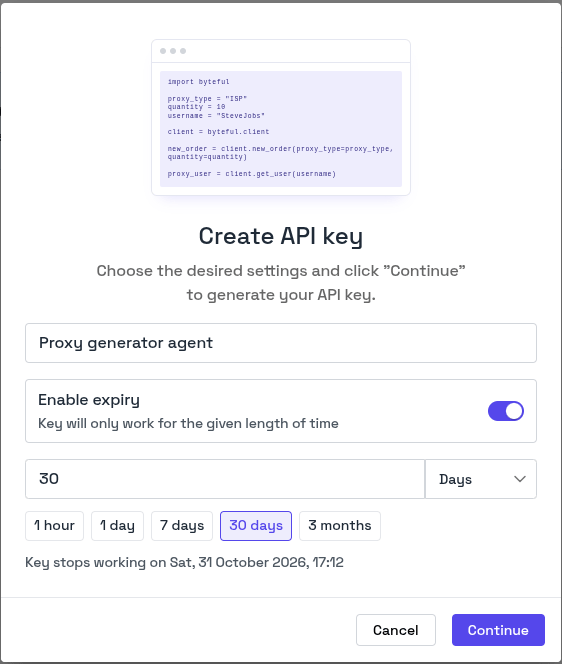
3. Enter a name for the key.
4. To make the key expire, turn on **Enable expiry**. Then enter a length of time, or click a preset such as **30 days**.
5. Click **Continue**.
 * To give the key full access, keep **Unrestricted** selected.
* To limit the key, click **Fine-grained**, then select its permissions. See [Selecting Permissions](#selecting-permissions).
You can see the private key only once. After you close this pop-up, you cannot see it again. If you lose the private key, delete the key and create a new one.
You must copy the private key before you can click **Back to dashboard**.
## Selecting Permissions
When you click **Fine-grained**, the modal shows the permissions grouped by object, for example `proxy`, `proxy_user` and `service`. Each permission has the name `resource.action`, for example `proxy.search`.
* To give the key full access, keep **Unrestricted** selected.
* To limit the key, click **Fine-grained**, then select its permissions. See [Selecting Permissions](#selecting-permissions).
You can see the private key only once. After you close this pop-up, you cannot see it again. If you lose the private key, delete the key and create a new one.
You must copy the private key before you can click **Back to dashboard**.
## Selecting Permissions
When you click **Fine-grained**, the modal shows the permissions grouped by object, for example `proxy`, `proxy_user` and `service`. Each permission has the name `resource.action`, for example `proxy.search`.
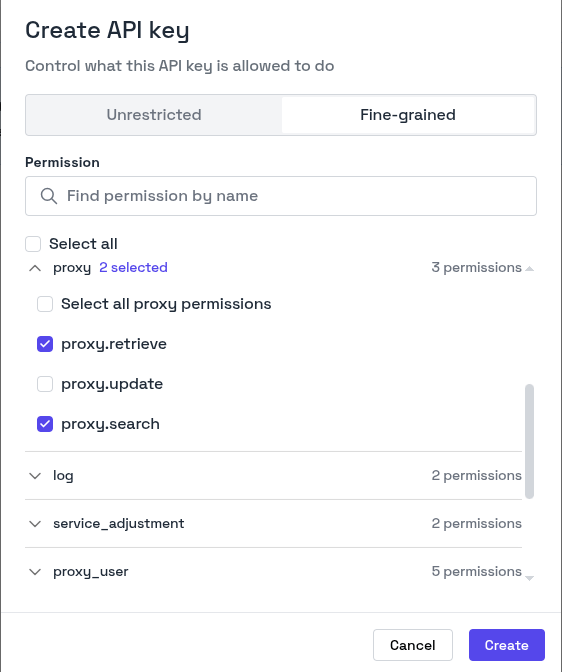 You cannot give a key a permission that you do not have yourself.
This documentation is built and hosted on [Mintlify](https://mintlify.com), a developer documentation platform.
You cannot give a key a permission that you do not have yourself.
This documentation is built and hosted on [Mintlify](https://mintlify.com), a developer documentation platform.