> ## Documentation Index
> Fetch the complete documentation index at: https://documentation.byteful.com/llms.txt
> Use this file to discover all available pages before exploring further.
# Billing Cycles & Credit System
> Understanding billing cycles and the credit system in the Byteful API
The Byteful billing system is built on Stripe's subscription architecture, providing flexible billing cycles and a credit balance system for managing your proxy services.
### Best Practices
1. **Maintain sufficient credit balance**: Ensure smooth service continuity by keeping your credit balance topped up
2. **Use quarterly or annual billing** for better pricing on long-term commitments
3. **Top up before API purchases** since credit is required for all API-initiated purchases
## Credit System
The credit system serves as a prepaid balance that is used for all API purchases.
### API Purchasing Requirement
Services can only be purchased via the API using your account credit balance. You must top up your account with credit prior to using the API to make purchases.
### Viewing Your Credit Balance
You can check your current credit balance through the API:
```bash theme={null}
curl --request GET \
--url 'https://api.byteful.com/1.0/public/user/customer/retrieve' \
--header 'X-API-Public-Key: your_public_key' \
--header 'X-API-Private-Key: your_private_key'
```
The response includes your current credit balance:
```json theme={null}
{
"data": {
"credit_balance": 500, #displayed in cents
// Other customer fields...
},
"message": "Customer successfully retrieved."
}
```
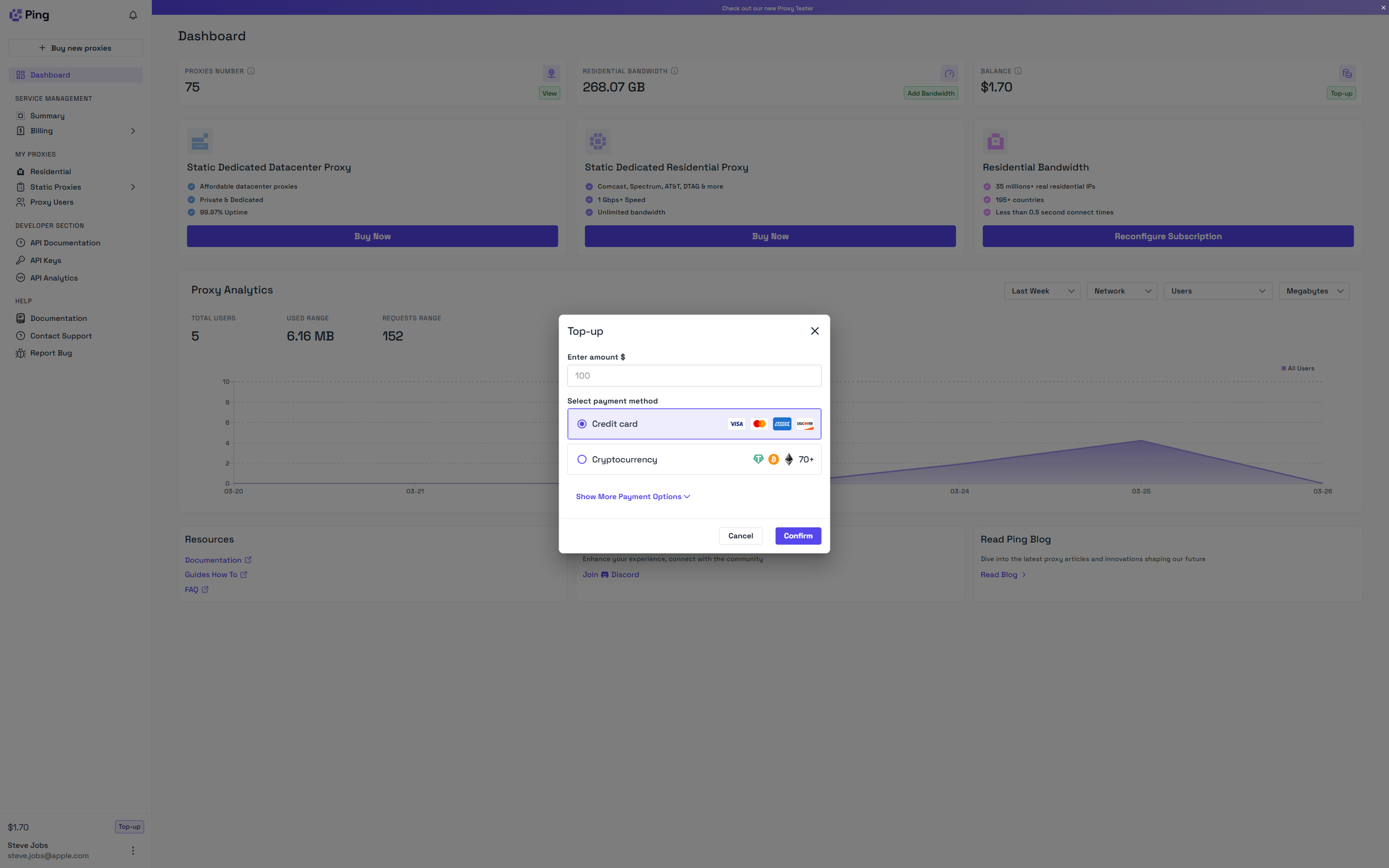
### Adding Credit
You can add credit to your account via the dashboard top up flow. Credit can be added by card payment, cryptocurrency or ACH payment.
 ## Invoice Generation & Credit Application
Invoices are generated at key points in the service lifecycle:
1. **Initial Purchase**: When you first purchase a service
2. **Renewal**: At the end of each billing cycle
3. **Service Reconfigurations or Top Ups**: When service quantity or billing cycloe is reconfigured
### Automatic Credit Application
When an invoice is generated, the system automatically:
1. Checks your available credit balance
2. Applies the credit to reduce the invoice amount
3. Updates your remaining credit balance
Example of how credit is applied during checkout:
```bash theme={null}
curl --request POST \
--url 'https://api.byteful.com/1.0/public/user/checkout/quote' \
--header 'Content-Type: application/json' \
--header 'X-API-Public-Key: your_public_key' \
--header 'X-API-Private-Key: your_private_key' \
--data '{
"product_code": "isp_us",
"quantity": 5,
"cycle_interval": "month",
"cycle_interval_count": 1
}'
```
Quote response showing credit application:
```json theme={null}
{
"data": {
"before_discount_total": 1750,
"credit_balance": 500,
"customer_credit_balance_applied": true,
"customer_credit_balance_applied_amount": 500,
"total": 1750,
"total_after_applied_credit": 1250
},
"message": "Quote generated successfully."
}
```
### Credit Return on Voided Invoices
If an invoice with applied credit is voided or canceled due to lack of payment after 48 hours, the credit is automatically released back to your account balance.
## Invoice Statuses
Invoices can exist in several states:
| Status | Description |
| ------- | ------------------------------------------------------------ |
| `draft` | Invoice has been created but not finalized |
| `open` | Invoice has been finalized and awaiting payment |
| `paid` | Invoice has been paid (either with credit or payment method) |
| `void` | Invoice has been voided and will not be paid |
For API purchases, invoices are typically in either 'paid' status (if covered by credit) or 'open' status (if additional payment is needed).
## Billing Cycle & Invoice Flow
1. **Service Creation**: A service is purchased through the API using account credit
2. **Initial Invoice**: Generated and marked as paid (if fully covered by credit)
3. **Service Activation**: Service becomes active after payment
4. **Renewal Invoice**: Generated at the end of the billing cycle
5. **Automatic Credit Application**: Available credit is applied to the renewal invoice
6. **Service Continuation**: Service continues if invoice is paid successfully within 48 hours of generation.
## Checking Invoice Status
You can view open invoices requiring payment:
```bash theme={null}
curl --request GET \
--url 'https://api.byteful.com/1.0/public/user/invoice/search?invoice_status=open' \
--header 'X-API-Public-Key: your_public_key' \
--header 'X-API-Private-Key: your_private_key'
```
You can view invoices associated with a service:
```bash theme={null}
curl --request GET \
--url 'https://api.byteful.com/1.0/public/user/service/retrieve/API-1234-5678' \
--header 'X-API-Public-Key: your_public_key' \
--header 'X-API-Private-Key: your_private_key'
```
The response will include the `open_invoice_id` field if there's a pending invoice:
```json theme={null}
{
"data": {
"service_id": "API-1234-5678",
"service_name": "AT&T ISP Proxies [US]",
"service_status": "active",
"open_invoice_id": "in_1TsPgdB2BUlqim5lkTytLb8K",
// Other service fields...
},
"message": "Service successfully retrieved."
}
```
## Invoice Generation & Credit Application
Invoices are generated at key points in the service lifecycle:
1. **Initial Purchase**: When you first purchase a service
2. **Renewal**: At the end of each billing cycle
3. **Service Reconfigurations or Top Ups**: When service quantity or billing cycloe is reconfigured
### Automatic Credit Application
When an invoice is generated, the system automatically:
1. Checks your available credit balance
2. Applies the credit to reduce the invoice amount
3. Updates your remaining credit balance
Example of how credit is applied during checkout:
```bash theme={null}
curl --request POST \
--url 'https://api.byteful.com/1.0/public/user/checkout/quote' \
--header 'Content-Type: application/json' \
--header 'X-API-Public-Key: your_public_key' \
--header 'X-API-Private-Key: your_private_key' \
--data '{
"product_code": "isp_us",
"quantity": 5,
"cycle_interval": "month",
"cycle_interval_count": 1
}'
```
Quote response showing credit application:
```json theme={null}
{
"data": {
"before_discount_total": 1750,
"credit_balance": 500,
"customer_credit_balance_applied": true,
"customer_credit_balance_applied_amount": 500,
"total": 1750,
"total_after_applied_credit": 1250
},
"message": "Quote generated successfully."
}
```
### Credit Return on Voided Invoices
If an invoice with applied credit is voided or canceled due to lack of payment after 48 hours, the credit is automatically released back to your account balance.
## Invoice Statuses
Invoices can exist in several states:
| Status | Description |
| ------- | ------------------------------------------------------------ |
| `draft` | Invoice has been created but not finalized |
| `open` | Invoice has been finalized and awaiting payment |
| `paid` | Invoice has been paid (either with credit or payment method) |
| `void` | Invoice has been voided and will not be paid |
For API purchases, invoices are typically in either 'paid' status (if covered by credit) or 'open' status (if additional payment is needed).
## Billing Cycle & Invoice Flow
1. **Service Creation**: A service is purchased through the API using account credit
2. **Initial Invoice**: Generated and marked as paid (if fully covered by credit)
3. **Service Activation**: Service becomes active after payment
4. **Renewal Invoice**: Generated at the end of the billing cycle
5. **Automatic Credit Application**: Available credit is applied to the renewal invoice
6. **Service Continuation**: Service continues if invoice is paid successfully within 48 hours of generation.
## Checking Invoice Status
You can view open invoices requiring payment:
```bash theme={null}
curl --request GET \
--url 'https://api.byteful.com/1.0/public/user/invoice/search?invoice_status=open' \
--header 'X-API-Public-Key: your_public_key' \
--header 'X-API-Private-Key: your_private_key'
```
You can view invoices associated with a service:
```bash theme={null}
curl --request GET \
--url 'https://api.byteful.com/1.0/public/user/service/retrieve/API-1234-5678' \
--header 'X-API-Public-Key: your_public_key' \
--header 'X-API-Private-Key: your_private_key'
```
The response will include the `open_invoice_id` field if there's a pending invoice:
```json theme={null}
{
"data": {
"service_id": "API-1234-5678",
"service_name": "AT&T ISP Proxies [US]",
"service_status": "active",
"open_invoice_id": "in_1TsPgdB2BUlqim5lkTytLb8K",
// Other service fields...
},
"message": "Service successfully retrieved."
}
```